


Charm mPHR
4.352.00 Reviews
App Specs
- Version
- 1.6.6
- Updated On
- License
- Free
- Downloads
- 50,000+
- Developer
- Charm Health Apps / MedicalMine
- Categories
- Medical
- Platform
- Android
Screenshots
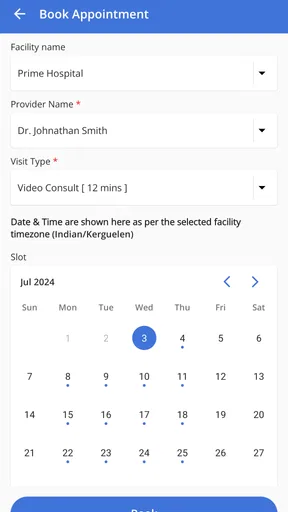
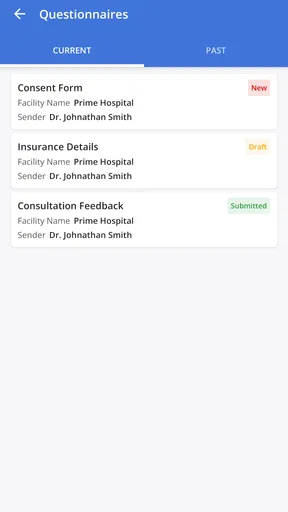
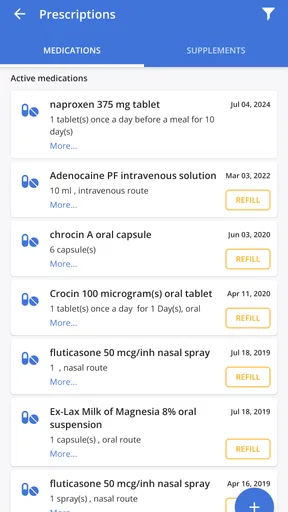
 Analysis by AppCompare
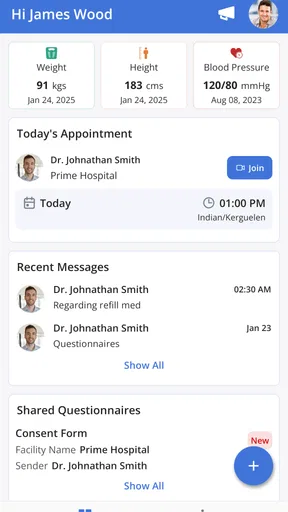
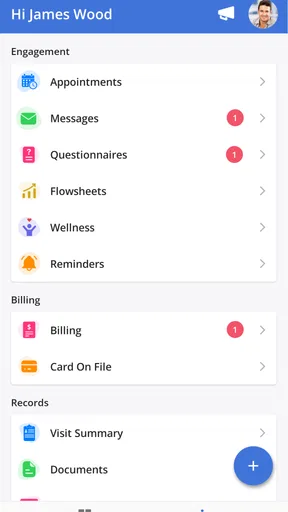
I started looking at Charm mPHR as the kind of medical app that makes the most sense when healthcare information needs to be shared carefully, not casually. It is a free medical app from Charm Health Apps / MedicalMine, built around appointments, messages, and access to a shared health record from a medical practice. That focus immediately separates it from general wellness trackers: it is connected to the relationship between a patient and a practice, rather than trying to replace a doctor or turn a phone into a diagnostic tool.
In my experience, the most useful way to judge it is through an ordinary household situation. Imagine one person arranging an appointment, another family member helping remember the details, and a patient needing to review information later from a phone. Charm mPHR can make that coordination less dependent on forwarded screenshots, paper notes, or a long chain of messages. The important word is “shared,” though. Shared access can be convenient, but it also makes account boundaries and personal privacy worth thinking about before anyone else handles the device.
How Charm mPHR fits into everyday medical coordination
The app’s core value is straightforward: it brings practice-related tasks into one mobile place. I can see why someone would prefer that over switching between a calendar, an email inbox, a messaging service, and printed medical paperwork. Appointments are easier to keep in view, messages stay connected to the practice, and the shared health record gives the user a reference point when preparing for a visit or checking what was discussed afterward.
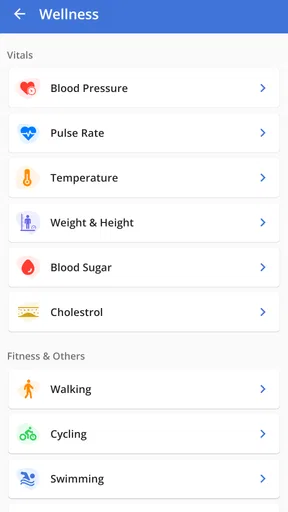
That does not make it a complete personal health manager. I would not approach it as a replacement for a symptom diary, medication reminder, emergency service, or independent medical advice. Its usefulness depends on the practice and the information available through that relationship. When the goal is to communicate with the practice or review the record it shares, the app has a clear job. When the goal is to combine data from every provider, monitor fitness, or manage a broad household health dashboard, a different tool may be more suitable.
A realistic example is a parent helping an older relative prepare for an appointment. The relative may remember the date but forget the questions they wanted to ask. With permission, the helper can assist with checking the appointment information and reviewing the practice’s shared record before the visit. Afterward, the patient can return to the same place to revisit the information rather than relying entirely on memory. That is a small workflow improvement, but medical visits often become difficult precisely because details are scattered.
I also found the app’s role more practical when used before and after an appointment, rather than opened only at the moment of need. Before a visit, checking the appointment details and writing down questions can make the conversation more focused. Afterward, reviewing the available record or sending a follow-up message can help keep the next step visible. I would still keep my own notes for symptoms, dates, and questions, because an app connected to a practice should not be treated as the only place where important personal information exists.
Setting up a shared device without blurring identities
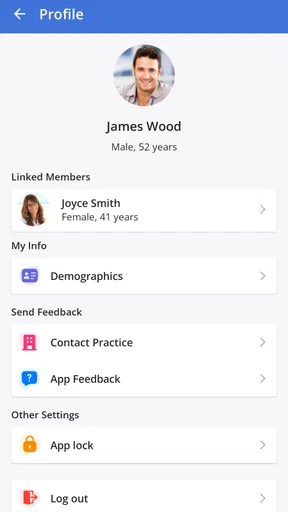
Household use is where I would be most deliberate. A phone or tablet may be shared, but a medical account should not automatically become a shared identity. The safest starting point is to decide whose account is being used, who is merely helping, and whether the patient is comfortable with that arrangement. I would avoid leaving the app open on a communal device, especially if other people can pick it up without asking.
Worth Reading Before You Choose

EA SPORTS FC Mobile 26 Is a Bigger Football Game, but It Takes Time

Flipboard Shows What News Apps Must Do Beyond the Feed

Switching to Android Auto Means Rethinking Your Driving Routine

Google Calendar Makes a Crowded Week Easier to Manage

Ludo King Makes the Most of the Minutes Between Plans

Baby Panda World Brings Quick Play to Modern Phones, but Its Game Library Feels Busy
This matters because a shared health record can contain information that is more personal than an appointment time. Even in a trusted household, not every family member needs to see every medical detail. A partner, adult child, caregiver, or roommate may help with scheduling while still not being the right person to browse the full record. Charm mPHR can support coordination only when the people involved respect those boundaries; the app itself should not be assumed to solve a family’s access decisions.
My practical setup would be simple. I would install it on the patient’s primary phone where possible, make sure the patient knows which account is active, and avoid saving access in a way that lets another person enter casually. On a shared tablet, I would sign out when finished and check the screen before handing the device to someone else. I would also avoid discussing sensitive messages through a family group chat just because several people are helping. The practice conversation belongs with the patient and the appropriate account.
Another useful habit is separating logistical help from medical interpretation. A relative can remind someone about an appointment, help locate a message, or sit nearby while the patient reads the record. That does not mean the relative should explain what a clinical note means or make decisions on the patient’s behalf. I like Charm mPHR more when it is used as a coordination tool that keeps the patient involved, not as a reason to move control away from them.
There is also a trade-off with convenience. The more a household depends on one person’s phone or login, the easier it may be for that helper to manage appointments, but the harder it becomes to preserve a clear boundary between assistance and access. If the patient can use the app independently, I would make that the default and offer help only when needed. If the patient cannot manage it alone, I would agree in advance on exactly what help is appropriate instead of treating general family closeness as unlimited permission.
Using appointments and messages as a shared workflow
The appointment area is most valuable when it becomes the household’s reference point. Rather than telling someone, “I think the visit is next week,” I would check the information in the app and use it to organize transport, time away from work, or a reminder. That reduces the risk of a family member relying on an outdated calendar entry. I would still compare the details with any direct instructions from the practice, because medical scheduling can change and the app should not be the sole basis for an urgent assumption.
Messages are useful for keeping communication tied to the practice instead of mixing it with ordinary texting. In a household scenario, one person might help the patient formulate a clear question, but I would make sure the patient knows what is being sent and why. A short message with the relevant appointment context is usually more helpful than a long explanation written by someone else. The patient should also know where to look for the response, particularly if a helper is the person who usually checks the phone.
I would not use ordinary practice messaging as an emergency channel. If a situation feels urgent, waiting for an in-app response is the wrong choice; the appropriate immediate medical service should be used instead. That is not a criticism unique to Charm mPHR, but it is an important boundary for any app that includes communication with a healthcare practice. The app can organize routine contact, while urgent care requires a faster and more direct route.
A less obvious benefit is continuity around a visit. If several people help with transport or reminders, the patient can use the appointment information as a shared point of reference without making every helper part of the medical conversation. For example, a family member can know when the appointment is while the patient remains the person who reads the message thread and decides what to share. That division keeps coordination practical without turning the whole household into an audience.
There is a corresponding weakness: the app cannot create coordination where the practice relationship is incomplete or where household members do not communicate clearly. If one person assumes another has read a message, the app will not prevent that misunderstanding. I would treat every important instruction as something the patient should personally verify, especially when several people are arranging care.
Age, trust, and the meaning of “shared”
Charm mPHR carries an Everyone content rating, which makes its intended audience broad in age terms, but that should not be confused with automatic suitability for every medical situation. A child, teenager, adult, and older patient may all interact with a medical app differently. The account holder, the patient, and the person providing technical help may not be the same individual, so I would clarify those roles before using it on behalf of someone else.
For an older adult, the app may be helpful when the main obstacle is remembering where appointment information or practice messages are located. I would introduce it slowly: first show how to open the appointment, then explain how to find messages, and only afterward discuss the shared record. That order keeps the first experience manageable. I would also let the patient operate the phone themselves while I explain, because confidence matters more than having a helper complete every step.
For a younger user, the same app raises a different question: who is supposed to manage the account and who is allowed to view the information? I would not assume that a parent’s access, a child’s access, and a caregiver’s access are interchangeable. Those decisions belong to the family and the relevant healthcare relationship. Charm mPHR may help with the practical side of reaching the practice, but it should not be treated as a substitute for discussing consent and responsibility.
Trust also includes the device itself. A trusted person can still accidentally expose a notification, leave a record visible, or send a message from the wrong account. I would use a private moment for medical conversations and avoid handing over an unlocked phone when the patient is not present. These are ordinary precautions, but they become especially important when one device serves multiple people.
One feature I value in this context is not a special family control, but the app’s narrow purpose. Because it is centered on practice appointments, messages, and the shared record, it can encourage a specific conversation: what does the patient need help doing today? That is healthier than giving a helper vague, unrestricted responsibility. The limitation is equally clear: users should not expect a built-in household management system to define every relationship or privacy rule for them.
What the app is like as a mobile medical tool
Charm mPHR is not a new release. It first appeared on June 26, 2020, and the current version is 1.6.6, with Android 6.0 or later required. That makes the minimum system requirement fairly approachable for people using an older Android phone, although compatibility is not the same as a smooth experience on every device. I would update the phone where possible and keep enough storage available for ordinary app operation rather than assuming an older handset will behave exactly like a newer one.
The app has reached over 50 thousand installs and holds a 4.3 average from 222 ratings, with 52 written reviews. Those figures suggest that people are using it for a real practice-connected purpose, but they do not tell me whether it will fit a particular clinic’s workflow or a specific household’s needs. I would judge it by whether the relevant practice uses the connected system effectively and whether the patient can access the information they actually need.
One reason I would choose it over a generic notes app is context. A note in a phone can record an appointment, but it does not provide the same practice-centered place for messages and a shared health record. A general calendar can remind me about a visit, but it cannot become the main point for reviewing practice communication. On the other hand, a broader personal health platform may be better for someone who wants medication tracking, wearable data, symptom trends, or records from several unrelated providers.
I also would not compare it directly with a hospital’s emergency app or a full patient portal without checking what each service is designed to do. Charm mPHR is most convincing when the user already has a connection to a participating practice and wants mobile access to that relationship. If the practice rarely uses messages or does not keep the relevant record available there, the app may feel less useful than its feature set suggests.
The free price removes an obvious barrier for someone deciding whether to try it, and the Everyone rating makes it easier to consider in a mixed-age household. Still, “free” does not remove the need for attention to privacy, account ownership, and medical judgment. I would install it because it offers a practical channel to a practice, not because I expect every healthcare task to fit inside one app.
Who should use it, and who should look elsewhere
I would recommend Charm mPHR to a patient who wants a direct mobile view of practice appointments, messages, and the shared record, especially when a family member provides occasional logistical help. It is also a sensible option for someone who dislikes keeping healthcare details across several unrelated apps. The strongest use case is routine coordination: preparing for a visit, checking communication, and keeping the patient connected to the practice between appointments.
I would be more cautious about recommending it to someone who expects a complete family health organizer. The app should not be selected on the assumption that every household member can have the same access or that one caregiver can manage all patients from one simple view. If the main requirement is extensive family administration, a service designed specifically around that need may be a better fit, provided its privacy model matches the family’s situation.
I would also look elsewhere if the main goal is emergency support, detailed health tracking, or cross-provider record aggregation. Charm mPHR’s strength is its practice relationship, and that strength becomes a limitation when the user wants a much wider medical toolkit. A separate calendar may still be useful for household logistics, while a symptom journal may be better for recording day-to-day changes. Using those tools alongside the app can be more realistic than expecting one product to do everything.
Before committing to it for a relative, I would answer a few practical questions through use rather than assumption: Can the patient sign in comfortably? Does the relevant practice communicate through the app? Can the household agree on who helps and what they can see? Is the patient able to distinguish routine messaging from urgent care? If those answers are positive, the app has a clear role. If not, installation alone will not fix the underlying problem.
My household verdict
After looking at Charm mPHR as a shared-use medical app, I see it as a focused tool rather than an all-purpose health companion. Its best contribution is reducing friction around the connection between a patient and a practice. Appointments, practice messages, and the shared record belong together, and having them available on a phone can make everyday coordination calmer.
The household angle requires discipline. I would use it with one clearly identified patient account, keep the patient involved, and treat relatives as helpers rather than automatic co-owners of medical information. That approach makes the app useful for reminders, preparation, and follow-up while respecting the fact that a shared device is not the same thing as shared medical authority.
My recommendation is positive for patients whose practice relationship matches the app’s purpose, but conditional for families. Install it when you want a free, practice-centered way to stay on top of appointments and communication. Skip it as your main solution if you need emergency care, broad health tracking, or unrestricted household management. Used within its proper boundaries, Charm mPHR feels like a practical bridge between the patient, the phone, and the medical practice—not a replacement for careful communication or personal judgment.
Pros
- Keeps personal health records organized in one accessible place.
- Can make doctor visits easier with readily available medical information.
- Useful for tracking important health details over time.
- May reduce reliance on scattered paper documents and files.
- Convenient for managing records while traveling or changing providers.
Cons
- Requires careful data entry to keep records accurate and complete.
- Access to records depends on a working device and app availability.
- Health information privacy depends on the app’s security practices.
- Some features may require compatibility with participating providers.
- Users may need time to learn the interface and organize older records.
FAQs for Charm mPHR
What is Charm mPHR and what can I use it for?
Charm mPHR is a personal health record application designed to help users organize and access important medical information in one place. Depending on the services enabled by your healthcare provider, it may allow you to review health records, appointments, medications, test results, care plans, and other clinical details. Its exact features can vary by organization, so the app is best understood as a companion to supported healthcare services rather than a replacement for professional medical advice.
Do I need an account or an invitation from a healthcare provider to use Charm mPHR?
In most cases, you need an account connected to a participating healthcare organization before you can use the full functionality of Charm mPHR. Some providers may send an invitation, activation link, or access instructions, while others may require registration through their patient portal. If your clinic or hospital does not use the platform, you may not be able to access records through the app. Check with your provider before downloading if access is essential.
What health information can I view in Charm mPHR?
The information available depends on what your healthcare provider shares through the platform and how the organization has configured its patient services. You may be able to view appointments, diagnoses, medications, laboratory reports, visit summaries, allergies, documents, or messages. Not every record is necessarily displayed immediately, and some sensitive information may require additional authorization. If something appears incomplete or incorrect, contact your healthcare provider rather than relying solely on the app.
Is Charm mPHR secure enough for storing personal medical information?
Charm mPHR is intended for handling personal health information and typically uses account authentication and security controls to protect access. However, no online service can guarantee complete protection against every risk. Use a strong, unique password, avoid signing in on shared devices, keep your phone updated, and enable any available security options. You should also review the app’s privacy policy and permissions so you understand how information is collected, processed, and shared.
Can Charm mPHR be used for emergencies or to replace a doctor’s advice?
No. Charm mPHR should not be relied on for emergency care, urgent diagnosis, or treatment decisions. The app is mainly intended to provide convenient access to health information and, where supported, communication with a healthcare organization. If you experience severe symptoms or believe you are facing an emergency, contact local emergency services immediately. For medication changes, test-result interpretation, or other medical concerns, speak directly with a qualified healthcare professional.


